
12.1 NextJS Introduction
# React Router (Not NextJS)
When building a pure React web app, and it is time to start navigating between pages you can add the React Router (opens new window) package. This can be used to create an app with multiple URLs instead of a SPA.
If you want to learn about React Router, you can watch the videos about it in the React Tutorial series on YouTube. It includes these videos on version 5 and 6 of React Router, as well as others on programmatic routing and navigation.
Instead of using React Router, we will be using the NextJS framework which comes with a built-in App Router that largely relies on your folder structure and conventions for file names.
# NextJS
NextJS is a framework that is built on top of React.
NextJS Version
We will be using version 13+ of NextJS. Pay attention to any references or online examples that you find. There are some big differences between version 12 and version 13+ of NextJS. We will discuss these as we go along.
It uses React as the foundation of the application, but layered on top of that are features provided by NextJS. One of the most important of those is the routing to different pages. A basic React app is built of components. React Router lets you assemble those components into pages by adding routes and the code for managing the routes.
NextJS simply imposes conventions that you follow when creating your folders. Based on those folders and file names, it will automatically create the routing. For the routing to work properly, there is some server-side code that needs to run on your hosting site. If you are using Netlify or Vercel for the hosting then that code can automatically run without any additional work from you, aside from following the conventions.
NextJS allows us to add a directive at the top of our component scripts - use client or use server. These directives will control where the component is rendered - in the browser or on the server
with the rendered content being sent to the browser. We will talk more about this as we progress through the NextJS features.
# Creating a NextJS Project
With NextJS, instead of using vite to create our project, we will use:
npx create-next-app@latest
This will run the latest version of create-next-app in memory to create your NextJS app. After running this command and agreeing to load create-next-app, you will be faced with the following
questions:
What is your project named? my-app
Would you like to use TypeScript? No / Yes
Would you like to use ESLint? No / Yes
Would you like to use Tailwind CSS? No / Yes
Would you like to use `src/` directory? No / Yes
Would you like to use App Router? (recommended) No / Yes
Would you like to customize the default import alias (@/*)? No / Yes
2
3
4
5
6
7
The name of the project will become the folder that is created. Use the defaults for all the following questions - No, Yes, No, No, Yes, No.
This process will set up all the required node_modules too.
After this is finished running we can run our three main scripts from package.json.
npm run dev
npm run build
npm run start
2
3
These are the same as the React scripts except the preview command from a React project is a start command in a NextJS project.
# NextJS Folders and Files
As already mentioned, in NextJS we have conventions which, when followed, will create routing. So, that means there will be files that you create which represent pages and other files which will
create components. Components we work with in plain ReactJS. You should already be comfortable with the idea of components. Pages are containers for components.
Version 13+ of NextJS has a new router called the App Router, which is built on top of React Server Components. The React Server Component is the technology that the use client and
use server are built on top of.
NextJS Routing reference (opens new window)
NextJS version
The current version of NextJS, as of March 2024, is 14.1.
When running the create-next-app command, we answered the question to say that we didn't want the src folder and we did want to use App Router. So, the default project structure (as shown in the
image below) has a folder called app which is where all our jsx code will go.
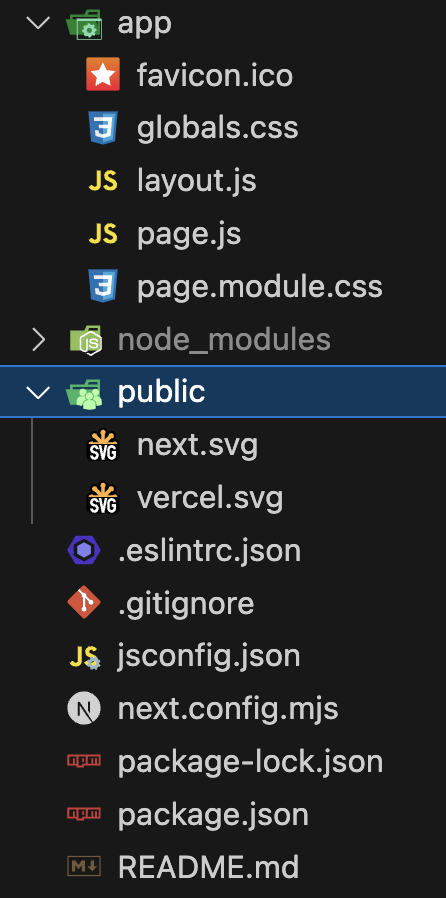
In this default setup we have four key files - layout.js, page.js, page.module.css, and global.css.
The layout.js file creates the layout that will be used for a page route. In this case it is the layout file for the app folder, the root page for the site. It creates the structure for the layout
that will be used for child pages, unless there is another layout.js file in a subfolder that will overwrite the parent one. Typically it just creates the html and body elements. The metadata
object will let you define the meta and link and title tags inside the <head>.
// /app/layout.js
import { Inter } from 'next/font/google';
import './globals.css';

const inter = Inter({ subsets: ['latin'] });

export const metadata = {
  title: 'Create Next App',
  description: 'Generated by create next app',
};

export default function RootLayout({ children }) {
  return (
    <html lang="en">
      <body className={inter.className}>{children}</body>
    </html>
  );
}
2
3
4
5
6
7
8
9
10
11
12
13
14
15
16
17
18
Then we have the page.js file which takes the place of the {children} in layout.js.
// /app/page.js
import Image from 'next/image';
import styles from './page.module.css';

export default function Home() {
  return (
    <main className={styles.main}>
      <p>This is the actual page content that will be used in place of "{children}" inside layout.js</p>
    </main>
  );
}
2
3
4
5
6
7
8
9
10
11
The global.css file is the only place that you are allowed to add CSS which will be applied to every page and component across the entire application.
The page.module.css file will contain the css that is directly applied to the page.js file and its contents. Notice the different syntax for importing the CSS. There is actually a name for the
import - styles. All of the styles that you have inside page.module.css will be properties of this styles object.
Inside page.module.css you should use class names for all your styles. The class names become the properties inside the styles object. Then use things like styles.main to refer to .main{ } in
the css file. Any CSS file whose name ends with module.css will automatically become CSS that only applies to the current page.
All of your page.js files are the pages of your application.
As you create folders and nested folders inside of /app/ these become the routes for your application. Each folder should have a page.js file. Inside the page.js file you can reference and load
any components that you want, just like you did with React apps.
The layout.js file inside /app/ is used as the base layout for every page unless you add a new overriding layout.js in a subfolder.
Outside of the app folder, you can create your components folder and place all of your reusable component files inside there.
There are other files with special names that you can use too:
error.jsAn error page to display for the current route if an error occursnon-found.jsA 404 error page for the current folder / route.loading.jsA loader page to display while building the current route pages.
You can use either .js, .jsx, or .tsx file extensions for any of these files.
# What to do this week
TODO Things to do before next week.
- Read all the content from
Modules 12.1, and 12.2. - Finish watching the React in 2021 Video Tutorial Playlist (opens new window)