# CORS
# What is a Domain or Origin?
A domain refers to the name we give to a webserver's ip address. We could be talking about anything on specific computer or a specific folder on a specific computer. example.com is a domain name. he .com part is called the super domain. We can also add a subdomain like www in front of the domain to get www.example.com. This would be called a Full qualified domain name.
An origin refers to a domain name PLUS a protocol, like https: and a port number. Eg: :80. All together the origin would look like this - https://www.example.com:80. That is an origin.
When an HTML file is loaded by a user-agent , typically a browser, the origin of that HTML file defines the origin for everything else that happens on a webpage.
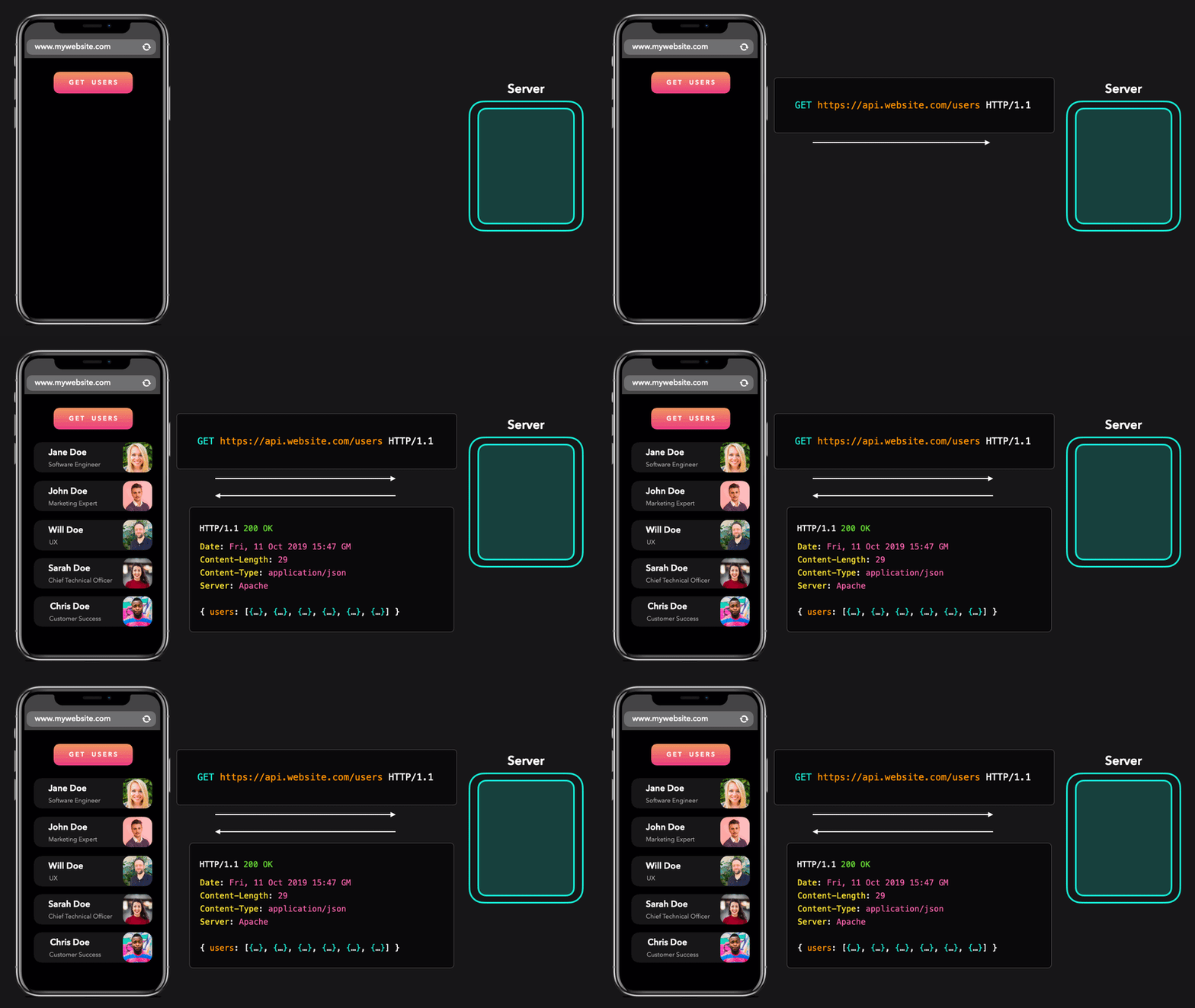
In this image we are seeing a fetch request for application/json data being sent from the script that is being run from the origin https://www.mywebsite.com. The GET request is being sent to https://api.mywebsite.com. The protocol, ports, and domain names match so the response is allowed and the script is able to display the data on the page.
# What Does Cross-Origin Mean?
The browser downloads and reads the HTML file looking for other assets to load. If any of those assets come from a different origin than the HTML file, then we are talking about a cross-origin request.
If the browser is making a simple request for assets that will be displayed directly on the page with no client-side processing then we are allowed.
If we are using JavaScript to get the asset, this opens up the possibility of malicious data interacting with your script and gaining access to user data. Now our cross-origin request can be intercepted by the browser based on the same-origin policy.
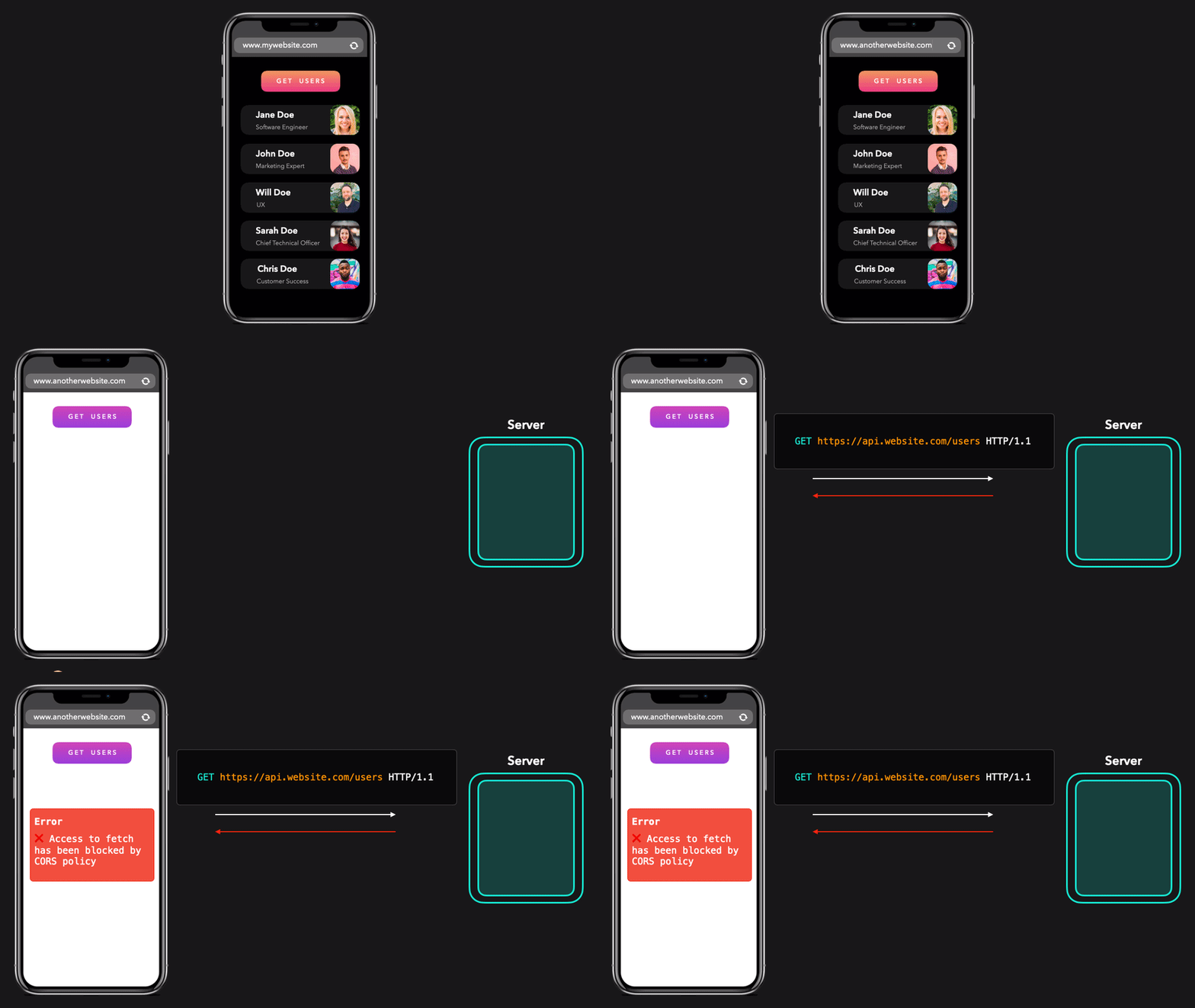
In this second example, we are making the request from https://anotherwebsite.com. The origins are different so the the same-origin policy kicks in and says no.

# Bad Ports
It is worth noting that while you can generally make fetch requests to your server and respond to them over any port that you want, there are some that are considered BAD.
If the port you are using appears in this list then your fetch call will be denied by the browser.
| Port | Typical service |
|---|---|
| 1 | tcpmux |
| 7 | echo |
| 9 | discard |
| 11 | systat |
| 13 | daytime |
| 15 | netstat |
| 17 | qotd |
| 19 | chargen |
| 20 | ftp-data |
| 21 | ftp |
| 22 | ssh |
| 23 | telnet |
| 25 | smtp |
| 37 | time |
| 42 | name |
| 43 | nicname |
| 53 | domain |
| 69 | tftp |
| 77 | — |
| 79 | finger |
| 87 | — |
| 95 | supdup |
| 101 | hostname |
| 102 | iso-tsap |
| 103 | gppitnp |
| 104 | acr-nema |
| 109 | pop2 |
| 110 | pop3 |
| 111 | sunrpc |
| 113 | auth |
| 115 | sftp |
| 117 | uucp-path |
| 119 | nntp |
| 123 | ntp |
| 135 | epmap |
| 137 | netbios-ns |
| 139 | 9 netbios-ssn |
| 143 | imap |
| 161 | snmp |
| 179 | bgp |
| 389 | ldap |
| 427 | svrloc |
| 465 | submissions |
| 512 | exec |
| 513 | login |
| 514 | shell |
| 515 | print err |
| 526 | tempo |
| 530 | courier |
| 531 | chat |
| 532 | netnews |
| 540 | uucp |
| 548 | afp |
| 554 | rtsp |
| 556 | remotefs |
| 563 | nntps |
| 587 | submission |
| 601 | syslog-conn |
| 636 | ldaps |
| 993 | imaps |
| 995 | pop3s |
| 1719 | h323 gatestat |
| 1720 | h323 hostcall |
| 1723 | pptp |
| 2049 | nfs |
| 3659 | apple-sasl |
| 4045 | npp |
| 5060 | sip |
| 5061 | sips |
| 6000 | x11 |
| 6566 | sane-port |
| 6665 | ircu |
| 6666 | ircu |
| 6667 | ircu |
| 6668 | ircu |
| 6669 | ircu |
| 6697 | ircs-u |
# Same-Origin Policy
The same-origin policy is implemented by all modern browsers and has been for years. You would have to go back to IE 10, whose long term support has officially ended, to find a browser that doesn't implement the CORS same-origin policy.
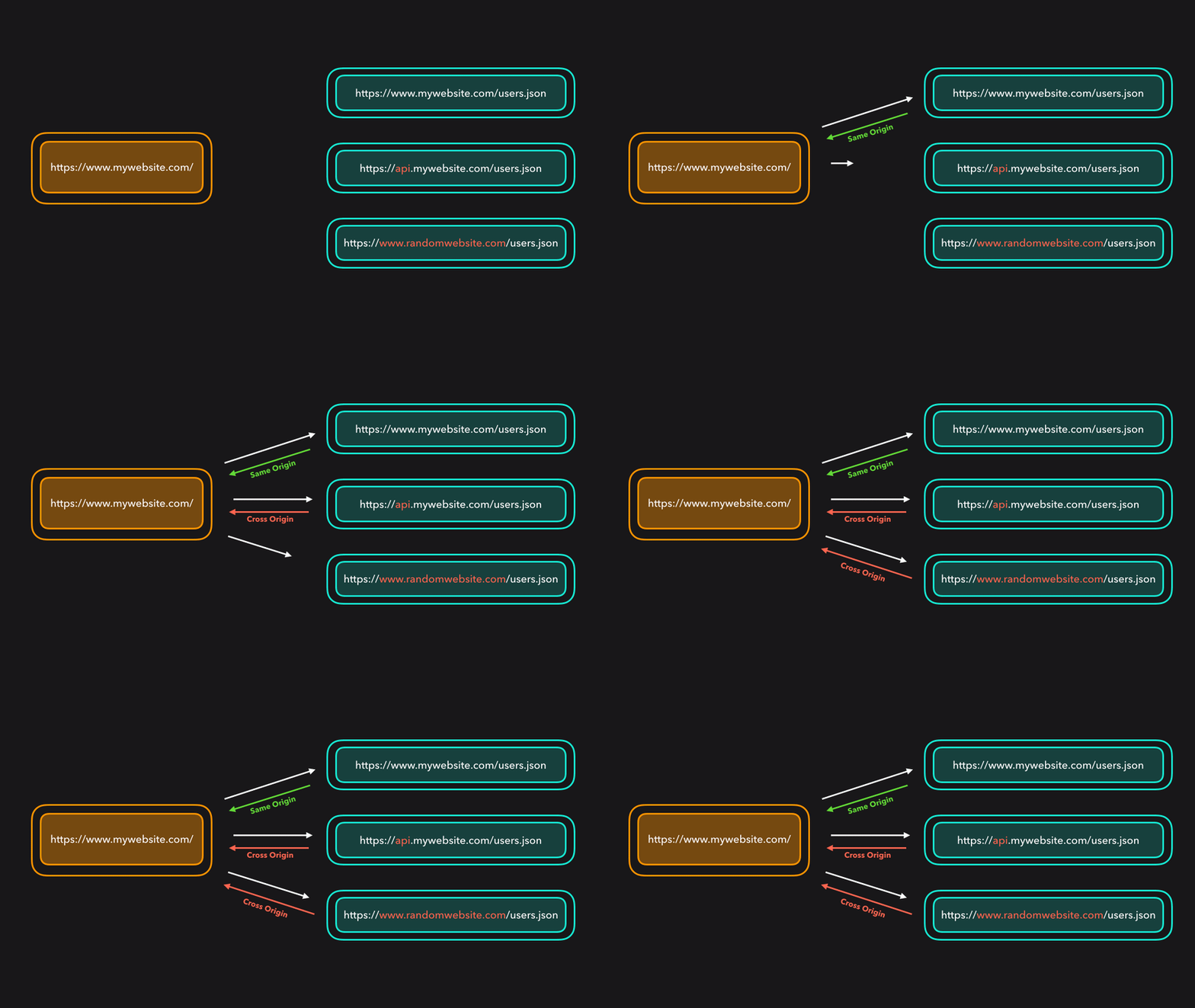
Rule One in this policy is that if the origin of your HTML file is the same as the origin of the resource that you are requesting with fetch() then all is fine. Do whatever you want with the asset. Download it, parse it, process it, or display it on the page.
The challenges and rules come when you need an image or JSON data from a different origin.
# NOT the same origin
When a request is NOT covered by the same-origin policy, that is when CORS kicks in.
When we make a fetch call, we can add an options setting for mode and set it to cors. We are explicitly telling the browser that we intend to make a CORS request.
Try running this following line in the browser dev console.
fetch('https://cors-demo.glitch.me/', { mode: 'cors' });
We will get an error message that says something like this:
Access to fetch at 'https://cors-demo.glitch.me/'
from origin 'https://www.example.com' has
been blocked by CORS policy:
No 'Access-Control-Allow-Origin' header is present
on the requested resource. If an opaque response
serves your needs, set the request's mode
to 'no-cors' to fetch the resource with CORS disabled.
2
3
4
5
6
7
This error message is actually telling us how to fix the problem.
# The Server Needs to Help
The requested resource is missing an Access-Control-Allow-Origin header. The server needed to send us an HTTP Response which included that header and the value of that header needed to match the origin of our HTML file.
Here is another fetch request that you can test in the console.
fetch('https://cors-demo.glitch.me/allow-cors', { mode: 'cors' });
This one is to a different end point /allow-cors. The end point name is not important. What is important are the headers in the response.
Open the network tab, find the request for the /allow-cors endpoint, and click on it. You should see the headers listed now. Scroll down to the Response Headers section. And you should see this:
access-control-allow-origin: *
That is the wildcard character, meaning that ALL origins are allowed to request this resource.
Note: if a request requires credentials then there must be an exact match for the origin. The wildcard character is NOT acceptable.
Ever want to protect a JSON resource so it can only be used on your own website? Server-side, add this header to all responses so that it can only be accessed by your own domain.
With a NodeJS server using Express, it would look something like this:
app.get('/my-resource', (req, res) => {
  res.set(('Content-Type': 'application/json'));
  res.set(('Access-control-allow-origin': 'https://example.com'));
  res.status = 200;
  res.send(`{"API-KEY":"123abcdef456"}`);
});
2
3
4
5
6
Now, only requests that are coming from https://example.com would be allowed to open and view that data.
These rules and steps may seem painful for developers to work around but there are real security risks that we are protecting our users from by the browser forcing us to follow the steps.
# Preflight Requests
When a browser has decided that you are not doing a same-origin request and it needs to do a CORS test, then it will make a preflight request.
Basically, it is still a fetch request but it uses the OPTIONS method, a smaller set of headers, and NO data or encoded files are sent to or received from the server.
The browser wants to know if it is allowed to talk to the server and request files of a specific mime-type from that origin, for its own current origin.
# Simple Requests
Once we are past the same-origin policy check the browser will next check to see if the Request is a simple request. A simple request will NOT trigger a pre-flight request.
A request is simple if it:
- Uses
GET,POST, orHEAD. - If headers are added by the script they are only these ones:
Accept* Safari has extra restrictions on values for this.Accept-Language* Safari has extra restrictions on values for this.Content-Language* Safari has extra restrictions on values for this.Content-Type
- If a
Content-Typeheader was added, it only has one of these values:
text/plainapplication/x-www-form-urlencodedmultipart/form-data
- If using the old
XMLHttpRequestobject, there is no listener for theuploadevent. - No
ReadableStreamobject is added to the request.
So, again, if it is a Simple Request, there will be no pre-flight request and everything is allowed to proceed.
# Not So Simple
If the request is determined to NOT be a simple request then the preflight request is sent using the OPTIONS method.
When the browser receive the response to the preflight request, it looks for the access-control-allow-origin header and compares it to your origin header.
If the two do NOT match, then the fetch request is denied and you get the error message in the console, that we saw above.
# Other Access-Control- Headers
There are actually other Headers in the Request and the Response that start with Access-Control-.
Here is an example of a preflight request and response.
OPTIONS /doc HTTP/1.1
Host: bar.other
User-Agent: Mozilla/5.0 (Macintosh; Intel Mac OS X 10.16; rv:71.0) Gecko/20100101 Firefox/81.0
Accept: text/html,application/xhtml+xml,application/xml;q=0.9,*/*;q=0.8
Accept-Language: en-us,en;q=0.5
Accept-Encoding: gzip,deflate
Connection: keep-alive
Origin: http://foo.example
Access-Control-Request-Method: POST
Access-Control-Request-Headers: X-PINGOTHER, Content-Type

HTTP/1.1 204 No Content
Date: Mon, 29 Mar 2021 01:15:39 GMT
Server: Apache/2
Access-Control-Allow-Origin: https://foo.example
Access-Control-Allow-Methods: POST, GET, OPTIONS
Access-Control-Allow-Headers: X-PINGOTHER, Content-Type
Access-Control-Max-Age: 86400
Vary: Accept-Encoding, Origin
Keep-Alive: timeout=2, max=100
Connection: Keep-Alive
2
3
4
5
6
7
8
9
10
11
12
13
14
15
16
17
18
19
20
21
In the Request we are using *-Request-Method to explain what we want to do after the preflight. We are using *-Request-Headers to list the headers that we will be adding via Script to the actual request.
In the Response we are getting *-Allow-Origin for the browser to compare to our origin header from the Request. We get *-Allow-Methods to say what the server is willing to accept for that endpoint. We get *-Allow-Headers to confirm that we are allowed to use those custom headers in our full request. And finally, we get *-Max-Age to say that this response will be valid for 86400 seconds (24 hours).
There is also a Access-Control-Allow-Credentials Response header to indicate whether or not cookies and authentication information is being sent and received. See the HTML crossorigin attribute notes att the bottom of this page for an example of sending those credentials.
If you want to send these credentials with your fetch request then add this to the options object in your fetch call. The value can be either omit or include. The default value is omit.
fetch(url, {
  mode: 'cors',
  credentials: 'include',
});
2
3
4
You won't see a
credentialsheader in your Request. If you set it toinclude, then you will see thecookiesandauthenticationheaders as required.
Another response header is Access-Control-Expose-Headers which is a list of custom headers that are not just allowed by the server, but ones that you are allowed to access through the Response with JavaScript.
Access-Control-Expose-Headers: X-My-Custom-Header, X-Another-Custom-Header
If we got this response in our preflight request then we would be able to do this.
fetch(url).then((response) => {
  console.log(response.headers.get('X-My-Custom-Header'));
  console.log(response.headers.get('X-Another-Custom-Header'));
  return response.json();
});
2
3
4
5
# Request Modes for Fetch Requests
When making your fetch call we can set a mode option.
fetch(url, {
  method: `POST`
  mode: `cors`,
  credentials: 'omit'
})
2
3
4
5
You can define a mode for a fetch request such that only certain requests will resolve. The modes you can set are as follows:
navigateYou will see this value in the network tab of the browser dev tools. We cannot use this for a fetch because it means that the user-agent wants to replace the current document with the one being retrieved.same-originonly succeeds for requests for assets on the same origin, all other requests will reject.corswill allow requests for assets on the same-origin and other origins which return the appropriate CORs headers.cors-with-forced-preflightwill always perform a preflight check before making the actual request.no-corsis intended to make requests to other origins that do not have CORS headers and result in an opaque response, but, this isn't possible in the window global scope at the moment.
# Preflight Responses
If the browser gets to the point of sending a preflight request, when the response comes back from the server, then the primary requirement is this:
The origin Request header value MUST match the value in the Access-Control-Allow-Origin Response header.
If this does not happen then you will get that error.
# What is an Opaque Response
An opaque response is for a request made for a resource on a different origin that doesn't return CORS headers. With an opaque response we won't be able to read the data returned or view the status of the request, meaning we can't check if the request was successful or not.
We get a response from the server. Just not a usable one.
Did you fetch an image and you now want to put it into a <canvas> element? That means being able to access the actual data in the file. If you get an opaque response you would not be able to put the image into the <canvas>.
# Mime-Type Failures
Browsers can also do checks to see if the Response Content-Type header matches what the content appears to be. For example, if the Content-Type header says that the file is text/plain but it is clearly a binary file like an image/png then the browser can also reject the response.
# Summary of Steps
If your request:
- Does Not meet the
same-originpolicy. - Uses a port from the BAD PORT list.
- Does Not meet the Simple Request requirements.
- Does Not successfully complete a preflight request and match the
originwith theaccess-control-allow-origin. - Does not meet the requirements of the other
Access-Control-*headers. - Does not have a valid
Content-Type.
Then...

Since you made it this far, we should also talk about CORB.
# HTML crossorigin attribute
While not directly connected with the CORS policy it is useful to discuss this attribute because it does have to do with cross-origin security.
The crossorigin attribute, can be added to the <audio>, <img>, <link>, <script>, and <video> elements, to provide support for CORS, by defining how the element handles cross-origin requests, thereby enabling the configuration of the CORS requests for the element's fetched data. Depending on the element, the attribute can be a CORS settings attribute.
The values for the attribute are anonymous or use-credentials
<img
  src="https://picsum.photos/id/1023/300/300"
  crossorigin="use-credentials"
  alt="sample image"
/>
2
3
4
5
Adding this attribute to those elements lets you decide whether or not identifying information along with those requests that are being sent to different origins.
If you needed to have a cookie set or other identifying information so that the server will allow you to get the asset, then you need to use the value "use-credentials".